- Log in
- Events
- Customer Service
-
Spain
|
English
Close
 Select
Northeast Asia
-
Korea
-
Japan
-
China
-
Hong Kong, China
Southeast Asia
-
Vietnam
-
Singapore
-
Indonesia
-
Philippines
-
Thailand
-
Cambodia
Americas
-
United States
Oceania
-
Australia
Europe
-
Germany
-
France
-
United Kingdom
-
Italy
-
Türkiye
-
Spain
-
Czech Republic
-
Hungary
Mongolia/Central Asia
-
Mongolia
-
Uzbekistan
-
Kazakhstan
-
Starlink In-flight Wi-Fi
Service Guide
- Eligible Routes: Select routes operated by A350-900 and A330-300 aircraft (As of September 15, 2026)
- Compatible Devices: Personal Wi-Fi enabled devices (smartphones, tablets, laptops, etc.)
- In-flight Essentials: Personal earphones or headphones
How to Connect
Connect your personal device to in-flight Wi-Fi once onboard
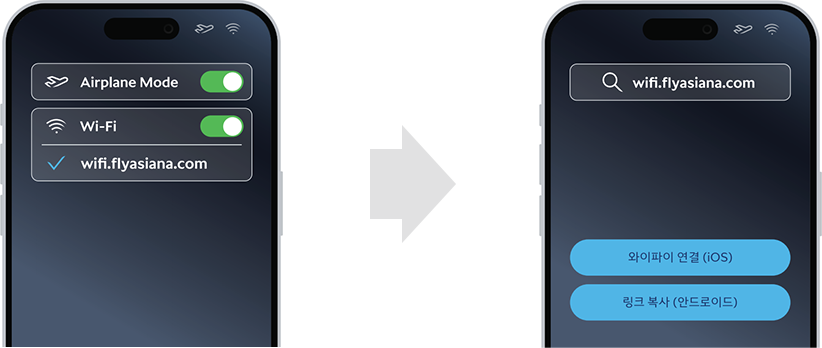
- [STEP 1]
Switch to Airplane Mode in your device settings, then turn on Wi-Fi.
Select the wifi.flyasiana.com network. - [STEP 2]
Tap Connect Wi-Fi (iOS) or Copy Link (Android) on the pop-up screen.
Agree to the in-flight etiquette and watch the required ad to access the service.
In-flight Wi-Fi Etiquette
Please follow our Wi-Fi etiquette to ensure a comfortable journey for everyone.
-
 Mandatory Earphone Use
Please use earphones when watching videos or playing games to respect surrounding passengers. Wi-Fi access or device use may be restricted if playing audio over speakers disturbs other passengers.
-
 No Voice or Video Calls
To maintain a quiet cabin environment, please use text messaging rather than voice or video calls.
-
 Considerate Content Viewing
Please choose content mindful of others in a shared space. Access to security-sensitive websites may be restricted.
-
 No Unauthorized Filming or Live Streaming
To protect the privacy of passengers and cabin crew, please refrain from photographing or recording others without consent.
-
 No Power Bank Usage or Charging
For in-flight safety, using portable power banks or charging devices while connected to Wi-Fi is strictly prohibited.
-
 No Device Holders
To prevent seat damage and ensure safety during emergency evacuations, please do not attach phone or tablet mounts to seats ahead or tray tables.
FAQ
Q How is Starlink inflight Wi-Fi different from existing paid inflight Wi-Fi services?
Starlink is fast, reliable internet on your flight. Stay connected from gate to gate — during taxi, takeoff, cruise, and landing.
Through the world's most advanced satellite constellation, Starlink delivers broadband internet that supports streaming, gaming, browsing and more while onboard.
Q What is the fee for using the Starlink in-flight Wi-Fi service?
The high-speed Starlink in-flight Wi-Fi service is complimentary for all passengers. You may enjoy unrestricted internet access throughout your flight without any additional fee.
Q When can I connect to and use the Starlink in-flight Wi-Fi?
The service is accessible from the moment you board the aircraft until the aircraft parks at your destination gate. Passengers can enjoy uninterrupted internet connectivity while waiting before takeoff and right after landing.
Please note that gate-to-gate service may be restricted in certain countries due to local regulations.
Q Is the Starlink in-flight Wi-Fi service available on all aircraft?
Starting from September 15, 2026, the service is available on select long-haul routes operated by nine (9) A350 aircraft and one (1) A330 aircraft. We plan to gradually expand this service to additional aircraft in our fleet in the near future.
Q Is the service available on domestic flights?
Yes. The service is available on domestic flights as long as the aircraft is equipped with Starlink.
Q How do I connect to the service? Do I need to install a separate application?
No app installation is required. Switch your device to Airplane Mode, turn on Wi-Fi, and connect to the wifi.flyasiana.com network.
Q Can I use multiple devices simultaneously?
Yes. You can connect any Wi-Fi-enabled personal device, including laptops, tablets, and smartphones.
Q Am I permitted to make voice or video calls in the cabin?
While the Starlink speeds support video calls, voice and video calls are strictly prohibited onboard to ensure a quiet and comfortable cabin environment and to respect fellow passengers.
Service will be temporarily unavailable when the aircraft passes through the airspace of certain countries where satellite communication approvals are restricted (e.g., China, India, Pakistan, etc.). Connectivity will automatically resume once the aircraft exits these airspace.
Q What should I do if I cannot connect to the Wi-Fi on board?
Please refer to the Starlink User Guide in your seatback pocket for step-by-step instructions. To ensure a seamless connection, we highly recommend using the latest OS version and web browser.
Q Can I verify in advance on the website whether my scheduled flight will offer Starlink Wi-Fi?
Since aircraft assignments are subject to operational changes, availability cannot be confirmed in advance during booking or on our website. Please check the seatback guide or listen for cabin announcements on the day of travel.
Q I was unable to use the Starlink Wi-Fi during my flight. Am I eligible for compensation?
As Starlink Wi-Fi is a complimentary service, compensation is not provided for service outages or disruptions. This policy applies uniformly across all instances where service is unavailable in whole or in part due to mechanical issues, aircraft changes, satellite communication outages, or network degradation.
Q Is in-flight Wi-Fi unavailable on A350 aircraft that are not equipped with Starlink?
Existing paid inflight Wi-Fi service remains available on A350 aircraft without Starlink. In such cases, you may connect to the onboard Wi-Fi network, select your preferred Wi-Fi plan, and complete the payment to access the internet.
